“If I had an hour to solve a problem I’d spend 55 minutes thinking about the problem and five minutes thinking about solutions.”
- (probably not) Albert Einstein
Fun fact: the quote above (or a version thereof) is often attributed to Albert Einstein, though there’s no hard evidence to support that.
Still, the principle makes sense, particularly in the field of software development, where industry standards evolve at a fast pace, and solutions are sought with quick turnaround. Understanding the problem before us is a crucial first step that will allow us to pick the right tools for the job.
In this post (and part II), I take a look at different ways of tackling tasks involving looping in python. I’ll be assessing these methods by performance and readability. It will become readily apparent that some approaches are simply not good enough. However, the opposite is hard to establish: there isn’t an absolute best method to handle tasks that involve a need to loop in Python. The correct method to use will depend on the task at hand. Therefore, it’s good expand our toolkit, otherwise
“if all you have is a hammer, everything looks like a nail”
Abraham Maslow, The Psychology of Science (1966)
All the code referred to in this post can be found here. I’d also like to thank mCoding for providing the inspiration for this post in one of their videos. Be sure to check this channel for some quality educational content.
Scenario
For the purposes of this exercise, we’ll consider one very specific task:
Suppose we want to find the sum of all the numbers in a consecutive range of integers. To achieve this, we will define a method sum_range(start, end), where start and end are both inclusive.
For example: sum_range(2, 8) should return 35 (2 + 3 + 4 + 5 + 6 + 7 + 8 = 35)
To get a more representative sense of how each approach behaves for different loads, we’ll evaluate performance in three scenarios:
- small range:
sum_range(123, 456) - medium range:
sum_range(123, 123_456) - large range:
sum_range(123_456, 123_456_789)
Setup
I created a Timer class to make timing and recording measurements for each method as seamless as possible:
import numpy as np
import pandas as pd


test_ranges = {
        'Small': (123, 456),
        'Medium': (123, 123_456),
        'Large': (123_456, 123_456_789),
    }


class Timer:
    """
    A simple class to track the running times of each function against all specified sets of arguments
    """
    time_units = ["s", "ms", "us", "ns"]

    def __init__(self, tests):
        self.tests = tests
        self.df_cols = ['Method', *list(self.tests)]
        self._stats = pd.DataFrame(columns=self.df_cols).reset_index().drop(columns=['index'])

    def __add__(self, row):
        """
        Add a row of results
        """
        self._stats.loc[len(self._stats)] = row

    @property
    def stats(self):
        """
        Present the stats in a user-friendly manner:
        - Format values as readable strings
        - Sort by reverse order of test cases, then by method name
        - Add 'Improvement' column to measure improvement between consecutive rows, for the last test case
        """
        result = self._stats.sort_values(by=list(reversed(self.df_cols)), ascending=False)
        result['PreviousBest'] = result[self.df_cols[-1]].shift(1)
        result['Improvement'] = (
            result['PreviousBest'] / result[self.df_cols[-1]] -1
        )

        return result.drop(columns=['PreviousBest'])

    def __repr__(self):
        return self.stats.to_string()

    def reset(self):
        """
        Delete all previous measurements
        """
        self._stats = self._stats.iloc[0:0]

    @staticmethod
    def time_to_string(value):
        """
        Convert given value in seconds to the a more readable form.
        Value is returned in the highest unit that yields a value >= 1 (up to ns).
        Return value is rounded to a resolution of 2 decimal places

        E.g.:
        12.5235 --> 12.52s
        0.1 --> 100ms
        0.001 --> 1ms
        0.00002 --> 20us
        2.23 * 1e-8 --> 22.3ns
        """
        result = ''
        for unit in Timer.time_units:
            print(value)

            if value >= 1:
                break

            if unit != Timer.time_units[-1]:
                value *= 1e3

        return f"{value:.2f}{unit}"

    def __call__(self, func):
        """
        Keep track of the time it takes to run a function
        """
        print(f"Timing {func.__name__}")

        times = []
        for range_limits in self.tests.values():
            print(f"\tUsing values = {range_limits}")
            res = %timeit -o func(*range_limits)
            times.append(np.average(res.timings))

        self += [func.__name__, *times]

        return times


t = Timer(tests=test_ranges)
TL;DR:
- it can be created with a set of test params, which will be used to run a test for each method
- it can be called with any given method, to run all tests on it
- it uses the magic
%timeitiPython method with the-oflag to measure the execution time of the method for each set of params
- it uses the magic
- results are stored in a dataframe, one row for each method’s stats
- a ‘Method’ column for the method name
- a column with the label for each set of params
- it presents the time measurements in a user friendly way:
- 12.35ms instead of 0.01235
- sort values by reverse order of the columns (last tests are first)
- add an extra column for the performance improvement between consecutive rows, for the last test
This is how the output looks:
| Method | Small | Medium | Large | Improvement |
|---|---|---|---|---|
| name1 | a | b | c | NaN |
| name2 | x | y | z | c/z -1 |
This way, if we want to test a new method, all we have to do after writing its implementation is call t(method_name), and all tests will be run and added to the results table.
Alright, with that out of the way, let’s look at our implementations! We’ll start with some basic looping patterns, and look into more advanced approaches in a future post.
Basic
These solutions leverage the basic Python loop syntax. If you’re an inexperienced programmer or you’ve just recently picked up Python, this is where I’d recommend starting.
C-style loops
Many developers picking up Python first learned to program in C (this was also my case). However, looping in C/C++ is very different from looping in Python, i.e.: in a Pythonic way.
In C-based languages, looping is done by gradually updating control variables, until our looping condition is falsy. Since looping is frequently employed to iterate over data structures such as arrays, this usually takes the form of initializing an index at 0, and incrementing it by one at the end of each iteration until it’s greather than or equal to the size of the data structure.
There are better mechanisms to loop in Python, which we’ll cover later in this post.
C-style looping over a list
To iterate over a list of all integers given their start and end indexes, first we need to create this list. This can be done in Python by casting the output of the range constructor to a list, and then assigning it to a local variable. Later in this post we’ll go over why this is a terrible idea, unless of course you’re trying to establish a performance baseline ;)
def sum_range_list_c_loop(start, end):
    """
    Create a list of each integer in the interval [start, end],
    and add each element to our result by indexing the list
    """
    result = 0

    values = list(range(start, end+1))

    ix = 0
    while ix < len(values):
        result += values[ix]
        ix += 1

    return result


print(t(sum_range_list_c_loop))
>>> [5.5577717142857156e-05, 0.021350504571428574, 21.469136885714285]
#### Looping with a control variable Creating a whole list just to loop over it once is a [code smell](https://en.wikipedia.org/wiki/Code_smell) and should get your spidey-senses tingling.

We can avoid the overhead of saving all the values to memory by using ix as both the control variable and the value to add.
def sum_range_c_control_variable(start, end):
    """
    Loop over a control variable traversing the range of integers in the interval [start, end],
    and add it to our result with each iteration
    """
    result = 0
    ix = start
    while ix <= end:
        result += ix
        ix += 1

    return result

print(t(sum_range_c_control_variable))
>>> [2.5590274285714747e-05, 0.011014649428571447, 13.32417085714286]
For-loops
Python for-loops are the go-to for looping in most cases. As long as our object is iterable, we can loop over each of its elements with for item in iterable_object . This has a few benefits:
- It’s more readable: no extra lines to create and maintain a control variable
- It’s easier to write: the syntax gets out of the way of the core logic
- It’s more efficient: it leverages optimizations in the language, under the hood
For-loop over a list
For the moment, let’s use a list of values again. Our sum_range task can thus be accomplished with:
def sum_range_list_for_loop(start, end):
    """
    Create a list of each integer in the interval [start, end],
    and add each to our result by iterating the list
    """
    result = 0

    values = list(range(start, end+1))
    for value in values:
        result += value

    return result

print(t(sum_range_list_for_loop))
>>> [4.3740124285715506e-05, 0.012686685428571504, 15.121409799999997]
#### For-loops over generators As mentioned earlier, lists that are iterated over only once are a code smell. When we only want to iterate over a list once, we should use a [generator](https://docs.python.org/3/glossary.html#term-generator) instead. Generators are lazy, and will only retrieve the values on command, one at a time, without storing them anywhere. That makes them both memory and time efficient, compared to lists.
Let’s switch up the previous implementation to use the values yielded by the range constructor directly:
def sum_range_generator_for_loop(start, end):
    """
    Loop over all values yielded by a generator of all integers in the range [start, end], and add each to our result
    """
    result = 0

    for value in range(start, end+1):
        result += value

    return result

print(t(sum_range_generator_for_loop))
>>> [1.9245818571427468e-05, 0.009257135571428503, 9.843927985714297]
This approach can be widely used for looping over more complex structures. It’s easily readable, and has decent performance for small data.
Looking back
Given the simplicity of our use cases, we still have better alternatives at hand. We’ll cover these in the next post. For now let’s see how our performance is looking for our while/for loops:
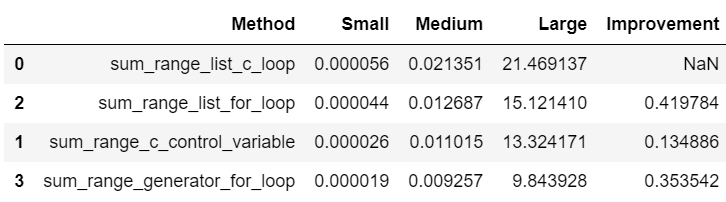
We can already draw a few conclusions from these results:
- looping over generators is faster than doing so over lists.
- in fact, it’s more efficient to keep updating the indexer variable manually than creating and iterating a list, since we forego the need for a large memory allocation (over 123 million integers, in the last test case)
- looping with an indexer is inefficient compared to using an iterator.
- we obtained a performance improvement of over 35% between the control variable and the generator looping implementations.
- it took a staggering 21 seconds to go through the larger test case when looping through a list with an indexer.
So far, we’ve achieved a performance increase of ~118% over the slower benchmark. In the next post, we’ll cover some more advanced approaches with significant performance increases. Stay tuned!